

In this guide, we break down the most effective DIY fixes for modern LG washers, including how to clean your filters, level a vibrating machine, and perform a master reset to get your laundry back on track without an expensive service call.
Quick Fix Checklist: 4 Common LG Washer Solutions
Before calling a repair technician, check these four areas to resolve the most frequent LG washing machine issues:
- Washer Not Draining? Clean the drain pump filter (found behind the small door at the bottom front). Rinse away lint and debris, and check the drain hose for any kinks or clogs.
- Vibrating Too Much? Ensure the washer is perfectly level. Use a wrench to adjust the leveling legs underneath and make sure all four feet are making firm contact with the floor.
- Won’t Fill or Fills Slowly? Turn off the water and unscrew the fill hoses from the back of the washer. Clean the small mesh inlet filters inside the valves to remove sediment or mineral buildup.
- The “Master Reset”: If the machine is acting glitchy or won’t turn on, unplug it for 60 seconds, then press and hold the Start/Pause button for 5 seconds while it’s unplugged. Plug it back in and try a “Spin Only” cycle.
How to Reset an LG Washing Machine
Before replacing parts, most power glitches can be resolved with a simple 5-second hard reset.
- Power Down: Press the Power button to turn the washing machine off.
- Disconnect Power: Unplug the washer from the wall outlet. If the plug is hard to reach, turn off the dedicated circuit breaker in your electrical panel.
- Drain Residual Energy: While the washer is unplugged, press and hold the Start/Pause button for 5 seconds. This discharges the capacitors on the control board.
- Wait: Leave the machine unplugged for at least 1 minute (3 to 5 minutes is even better for stubborn errors).
- Reconnect: Plug the washer back into the outlet or flip the circuit breaker back on.
- Test: Turn the power on and run a “Spin Only” cycle or a quick wash to see if the error code returns.
The Washer Won’t Fill or Fills Too Slowly
If your LG washing machine won’t fill or is filling too slowly, you’ll want to troubleshoot the incoming water supply and the water inlet valve.
Check the Incoming water supply
The incoming water supply refers to your household plumbing, the shutoff valve, and the hose that connects to the washing machine.
- Be sure to fully open the shutoff valve and remove any kinks or bends in the hose supplying your LG washer.
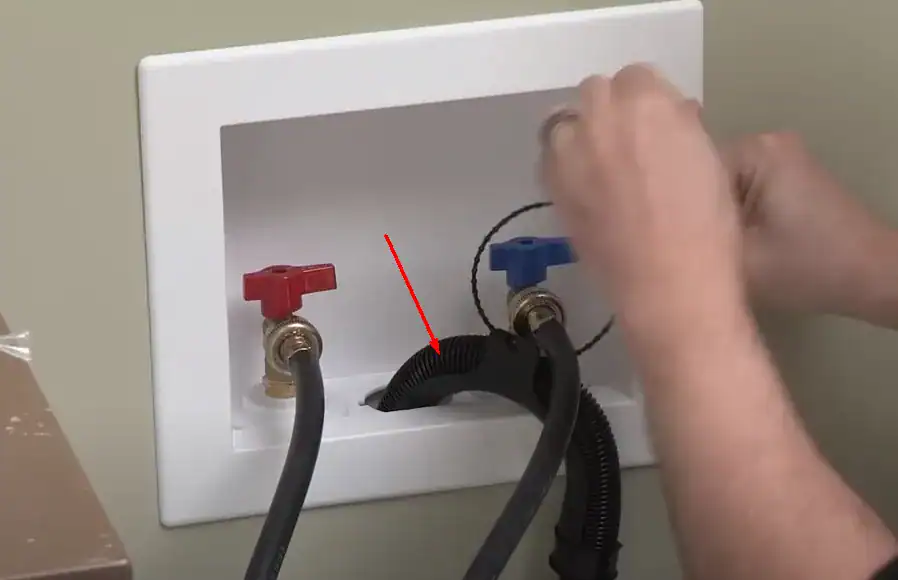
check the water inlet valve
The water inlet valve is a mechanical valve controlled electrically by the washing machine. It controls water inflow to the machine and can be physically stuck or clogged. A short circuit can also stop it from working.
Replacement water inlet valves run around $30 on Amazon click here.

Read: 5 Common LG Washing Machine Problems And Troubleshooting
LG Washer Won’t Spin
Let’s suppose your LG washer goes through the wash cycle like normal but doesn’t spin during the spin cycle. In that case, you’ll want to troubleshoot either the drive belt or motor coupling, depending on which LG washer model you have. Some models transfer power from the motor to the drum through a drive belt, while Direct Drive models use a motor coupling instead.
Why this happens: The spin cycle requires your LG washer to turn the drum at a very high rate of speed. That’s only possible if the drive belt or motor coupling is in excellent condition. So, if the washer doesn’t spin as it should, you either have:
- A worn-out drive belt that doesn’t have enough tension to spin the drum effectively. Pictured below.
- A worn-out motor coupling that isn’t gripping correctly, likely because parts of it have worn down or broken off
- Neither of these parts are repairable and need to be replaced. Drive belts are available on Amazon starting at $8 click here. Motor couplings run $15 on Amazon click here.
- You’ll likely have to remove the washer’s panels and take out the drum to replace the affected part.
Note: we may receive a small commission from your purchase, at no additional cost to you. Check model numbers before ordering.

LG Washer won’t spin properly
When an LG washer refuses to enter the high-speed spin cycle, the problem is usually caused by a communication break between the motor and the control board. Common culprits include broken motor wire harnesses, a failed Rotor Position Sensor (Hall Sensor), or a worn-out rotor assembly. Additionally, if the washer cannot drain its water due to a clogged filter or pump, it will skip the spin cycle entirely as a safety precaution.
Broken motor or speed sensor wires
In an LG washer, the motor and sensors rely on wire harnesses to receive power and instructions from the control board. Over time, the constant high-speed vibration of the machine can cause these wires to fray, snap, or pull loose, disrupting the electrical connection.
- Symptoms: You may hear a distinct grinding noise, or the motor may stutter because it is only running on two phases instead of three.
- The Problem: Broken or loose wires prevent the speed sensor or motor from communicating with the “brain” of the washer, often resulting in a machine that refuses to spin.
- The Fix: After disconnecting the power, you must inspect the harness for visible breaks. You can either splice and repair the individual broken wires or replace the entire wire harness assembly.
Rotor Position Sensor failed
The Rotor Position Sensor (also known as the Hall Sensor) is a critical component attached to the motor that tracks the drum’s speed and position. It relays this data to the control board to ensure the washer spins at the correct RPM for your selected cycle.
- Symptoms: A failed sensor usually results in unusual rhythmic noises, a drum that won’t spin, or the LE (Locked Motor) error code appearing on the display.
- Common Causes: The sensor can fail due to internal electrical faults or from the motor being consistently overworked by heavy, unbalanced laundry loads.
- The Fix: This part cannot be repaired and must be replaced. The process involves removing the back panel, taking off the rotor and stator, and swapping the old sensor for a new one on the stator housing.
Motor Rotor Assembly Worn Out
The Motor Rotor Assembly is the heavy, heart-shaped component at the back of the washer that houses powerful magnets. It fits onto the splined shaft of the drum, working with the stator to create the electromagnetic force needed to spin the tub at high speeds.
- Symptoms: If the washer makes a loud grinding or “stripping” noise when the motor tries to turn, but the drum stays still, the rotor is likely the culprit.
- The Problem: The internal plastic or metal grooves (splines) inside the rotor can wear down or “strip” over time. When these teeth disappear, the motor spins, but it can no longer grip the shaft to turn the drum.
- The Fix: This is one of the easiest mechanical repairs. After removing the rear panel, you simply unbolt the large center nut, slide the old rotor off, and install a new one. Be sure to hand-tighten and then snug the bolt to ensure the new splines seat correctly on the shaft.

Main Control board failure
The main control board acts as the “brain” of your LG washer, sending precise electrical signals to the motor to initiate and regulate the spin cycle. When this board is damaged—often due to power surges, moisture exposure, or aged capacitors—it can no longer “tell” the motor when to speed up or switch directions. This results in a machine that may fill and wash correctly but stalls completely when it reaches the spin stage.
- Symptoms: You might see the timer counting down while the drum remains stationary, or the machine may stop mid-cycle without a specific error code.
- The Cause: Burned-out relays or “cold” solder joints on the board break the circuit required to power the stator, leaving the motor unresponsive.
- The Fix: Since modern control boards are encased in a protective resin (potting), individual components are difficult to repair. The most reliable solution is a full replacement of the PCB unit.
LG Washer Won’t Drain
The Drain System is responsible for removing greywater from the drum multiple times during a cycle. For an LG washer to function correctly, water must flow freely through the drain filter, the electric drain pump, and out through the discharge hose into your home’s standpipe.
- Symptoms: You will see standing water in the drum at the end of a cycle, or the machine will stop and display the OE (Drain Error) code.
- The Problem: Over time, lint, hair, and detergent residue create a “sludge” that slows drainage. Additionally, foreign objects like coins, hairpins, or socks can physically jam the drain pump’s impeller or clog the filter.
- The Fix: Start by clearing the drain filter at the bottom front of the machine and checking the hose for kinks. If the system is clear of debris but still won’t empty, the internal drain pump motor has likely failed electrically or mechanically and must be replaced.
- The drain filter: You can find this on the front panel, close to the bottom. It’s concealed behind a small door. Remove the filter and clean it thoroughly.
- The drain hose: Detach the drain hose and flush out any blockages inside.

LG Washer Beeping, But No Error Code
Your LG washer beeping (but not showing an error code) is a sign of a minor issue, and nothing to be overly concerned about. Common causes include issues with the water intake or drainage system. It could also be that the laundry load is too large or the lid isn’t closed securely. Double check the components of the water intake as described above, and make the sure drain isn’t clogged.
The Washer Is Vibrating Too Much
It is normal for a washing machine to vibrate during the wash program. With excess vibrations, you’ll want to inspect the adjustable leveling legs underneath your LG washer. If it is off balance, it will shake too much, and possibly even ruin parts of the washing machine.
You need a wrench to adjust each of your washer’s legs. The washer typically comes with a wrench specifically for this purpose, though a standard wrench will do fine.

Your goal is to adjust each washer’s legs to get it perfectly level. A spirit (bubble) level would be helpful for this purpose. Make sure the washer is level front to back and side to side.
LG Washer Won’t Turn On? 3 Common Causes & How to Reset It
When an LG washing machine refuses to power on, the issue is usually tied to one of three main components: a malfunctioning Main Control Board (PCB), a failed Noise Filter, or a faulty Power Button Microswitch. Before replacing parts, most power glitches can be resolved with a simple 5-second hard reset. If the washer remains unresponsive after a reset, you’ll need to test the noise filter for incoming power or inspect the control board for visible signs of electrical damage.
Note: the washer will not respond to the Start button if the door isn’t closed securely. A faulty door switch will cause the same outcome even if the door is closed as it should be.
Main Control Board Malfunction
Failure in the circuit board (the brain of the washing machine) usually reveals itself in the washer working on and off intermittently, although complete machine failure could result. Newer control boards are not likely to fail unless they experience an environmental cause, such as power surge in a lightning storm. Too much heat or moisture (flood) could also destroy the control board. Most common is just simply age in an older machine.
The Failure: These boards are encased in a “potting” gel to protect them from moisture, but a single blown capacitor or a shorted relay will kill the whole unit.
The Sign: Often, if the board is the culprit, the reset (unplugging for 1 minute) will fail to bring the lights back on.
Before attempting repairs on the washing machine, attempt a reset as detailed above. If the reset only works temporarily, read the section on the noise filter below.
If this does not correct the problem, you will need a new board. Replacement control boards run $100-275 on Amazon and can be purchased here. See picture below. If you have an older machine and other components are wearing out, you might consider purchasing a new machine, instead.
READ this article on how to replace the control board: LG Washer Won’t Turn On
Note: we may receive a small commission off your purchase at no additional cost to you. Always double check model number before ordering.

Quick Checklist Before You Buy Parts
- Check the GFCI: Is the washer plugged into a GFCI outlet? If the “Reset” button on the outlet is popped out, the washer isn’t getting juice.
- Check the Breaker: Go to your home’s electrical panel and ensure the breaker hasn’t tripped to the middle position.
- The 5-Second Reset: Unplug the washer, hold the Start button for 5 seconds, wait 2 minutes, and plug it back in.
Noise Filter Failure
LG Washers have an electrical component called a noise filter that prevents any electromagnetic “noise” from entering the electrical circuit and having problems. Noise is simply fluctuations in voltage. Low amplitude noises aren’t as much of a problem, but the high fluctuations can be quite dangerous and damaging to your washer. A noise filter fails due to age or if it is short circuited (power surge). Symptoms:
- You hear audible static noises from the washing machine
- The control panel will not turn on at all
- How to Check: If you are comfortable using a
multimeter , you can check for 120V power going into the filter and 120V coming out. If power goes in but doesn’t come out, the filter is dead.
The noise filter cannot be repaired and should be replaced. Replacement noise filters run around $35 on Amazon and can be purchased here. Pictured below.
Before performing any repairs to a washer, you must disconnect the power and water supplies. This will reduce the risk of injury and prevent electrical shock.
Note: we may receive a small commission off your purchase at no additional cost to you. Always double check model number before ordering.

READ this article on how to replace the noise filter: LG Washer Won’t Turn On
Power Button Microswitch Lost Connection
Behind the control panel is a tiny micro-switch that is activated when you push the power button on the display. As with any electrical part, power surges, heat and moisture can cause failure. Test the switch by simply turning the cycle selector (in older models with a knob). Turning the knob should activate power to the machine; if it does not, more than the switch is broken.
Micro-switches cannot be replaced individually, and you will likely need a full control board replacement. Read above and follow the instructions here: READ this article on how to replace the control board: LG Washer Won’t Turn On
Frequently asked questions
Why LG Washer Won’t Turn Off?
Your LG washer won’t turn off if it’s suffering from some kind of glitch or other short-term error. You’ll have to perform a hard reset on the appliance to clear that error. Disconnect the washer and press the START/PAUSE button for 5 seconds to reset the washer.
How Long Do LG Washers Last?
LG washers typically last around 10 years with proper maintenance. While problems can happen during that time, they become much more likely to occur as the washer approaches the end of its lifespan.
Why LG Washing Machine No Power No Lights?
A lack of incoming power will cause your LG washer to have no power and no lights. First, check that the washer is plugged fully into a working wall socket. Then, check that the circuit breaker in your house’s main electrical box is also pushed to the ON position.
How Do I Stop My Washing Machine Drain From Clogging?
The best way to stop your washing machine drain from clogging is to clean the drain filter regularly. The filter will trap lint, dirt, and foreign objects so they don’t build up in other drain parts, causing a clog.
How Do I Run Diagnostics On My LG Washer?
Some LG washer models come with a Smart Diagnosis feature that works with your smartphone. The diagnostics process takes 10 seconds to complete and will show you any active errors through the LG SmartThinQ app.
Start by pushing the Power button to turn your washer on to use it. Then, place your phone mouthpiece between the Smart Diagnosis logo and the Power button. Next, press the Smart Diagnosis button, then press and hold the Temp button until the countdown ends.
LG Washing Machine Error Codes
The table below has common codes. Be sure to click on the links for more detailed repairs.
- UE often resolves by redistributing laundry.
- CL simply means Child Lock is on — hold the Child Lock button for 3 seconds to turn it off.
- IE + OE are the most common (water supply or drainage issues).
| Error Code | Meaning | Immediate Action |
|---|---|---|
| IE | Water inlet error (washer not filling properly) | Check water faucets and clean inlet filters. |
| OE | Drain error (water not draining) | Clean the drain filter and check the hose. |
| UE | Unbalanced load detected | Rearrange wet laundry and restart. |
| dE | Door not closed / door lock error | Ensure the door is fully shut and latched. |
| LE | Motor overload / locked motor error | Perform a power reset (unplug for 5 minutes). |
| PE | Water level pressure sensor error | |
| FE | Overfill error (too much water detected) | |
| TE | Thermistor (temperature sensor) error | |
| CE | Current / motor overcurrent error | |
| PF | Power failure during cycle | |
| SE | Hall sensor / motor sensor error | |
| CL | Child lock activated (not a failure) |
Connect with an Appliance Repair Tech
Click here to use the chatbox to speak with one of our technicians.
No in-home service calls. No appointments.
